Dialer Reports
How each dialer did: preview, predictive, blaster and callback
General
The Dialers group holds six reports, each looking at your outbound operation from a different angle. This one, General, is the history: one row per call attempt an agent made with a Preview or Automatic dialer.
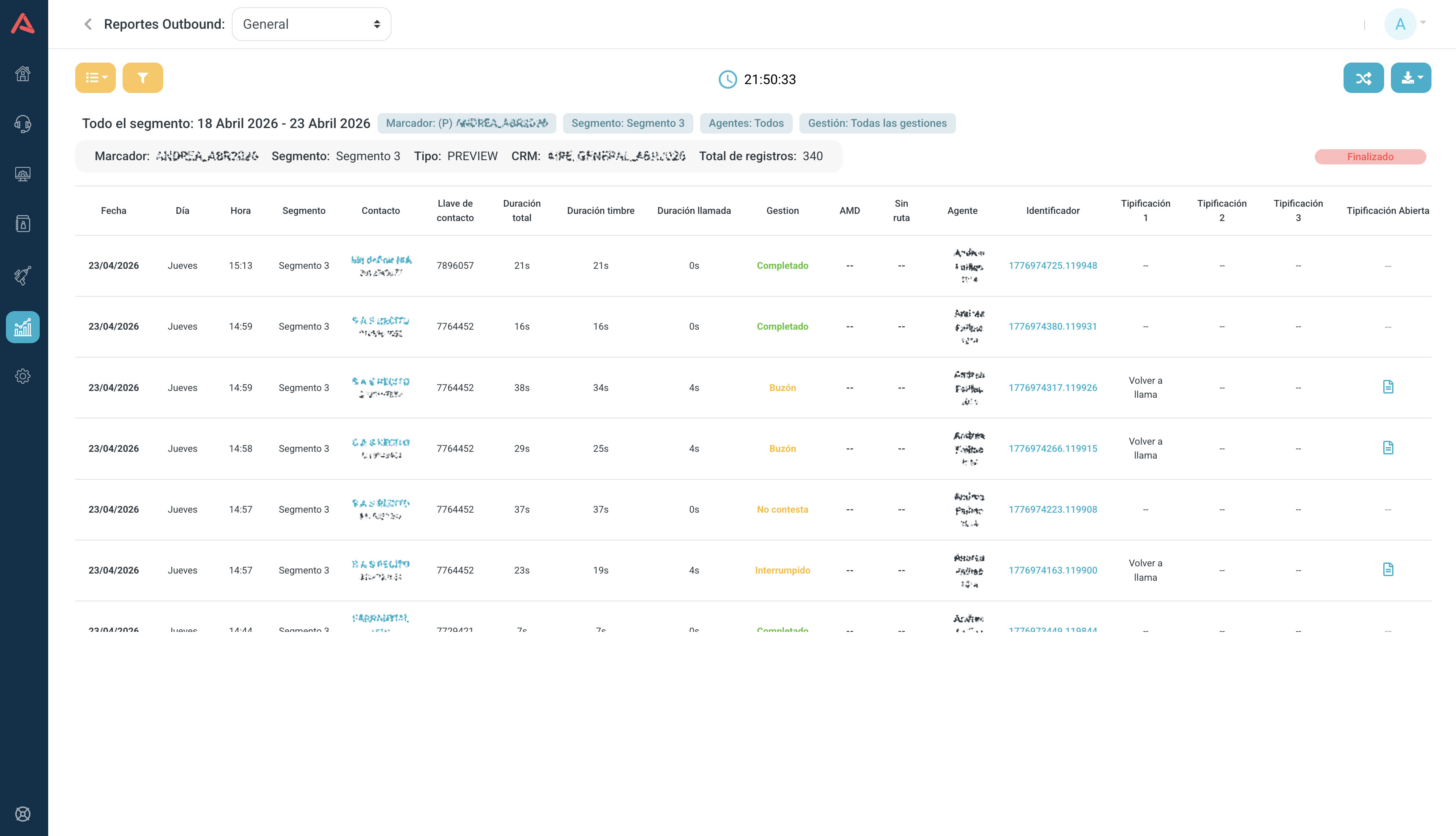
How the toolbar, the filters and the download work is in the Reports article. Here are the two things to understand before reading the table, and then the dictionary.
The dialer status
Top right there is a bar telling you where the segment stands: Finished if it is done, Started if it is running and Paused if someone stopped it. It keeps you from drawing conclusions from a campaign that is only halfway through.
AMD
AMD is the automatic detection of who picked up: human, machine when it reached voicemail, or failed. It only means something on automatic dialling, because on Preview the agent is already on the line.
Field dictionary
| Field | Description |
|---|---|
| Date | The day of the attempt |
| Day | The day of the week |
| Start time | When the attempt began |
| End time | When it ended |
| Dialer | Which dialer the call came from |
| Type | Whether the dialer is Preview or Automatic |
| Segment | The segment of the base being worked |
| CRM | Which CRM the contact came from |
| Contact | The contact's name |
| Phone | The number that was dialled |
| Contact key | The contact's unique identifier in the CRM |
| Total duration | The whole attempt, end to end |
| Ring duration | How long it rang before someone answered or it dropped |
| Call duration | How long they actually talked |
| ACW duration | How long the agent took to wrap up after hanging up |
| Management | How the call ended: complete, no answer, voicemail and so on |
| AMD | Who picked up, on automatic dialling |
| No route | Whether the call found no way out |
| Agent | Who made the call |
| Agent Number | Their number |
| Identifier | The call's unique identifier |
| Typification 1 | The main classification the agent entered |
| Typification 2 | The subcategory |
| Typification 3 | The third level |
| Open Typification | The agent's free-text comment |
| CSAT | The satisfaction score, if there was a survey |
| FCR | Whether it was resolved on first contact |
| NPS | The Net Promoter Score, if there was a survey |
The downloads
This report downloads in more than one shape. Contacts brings the contact data and Combined merges it with the call data into a single file. And Combine contacts does the same thing on screen.
Look at No route before blaming the database. A call with no route is not a bad number but a telephony configuration problem: the outgoing route does not cover that pattern, or the trunk did not carry it. It looks just like a contact failure and it is not one.
Callback
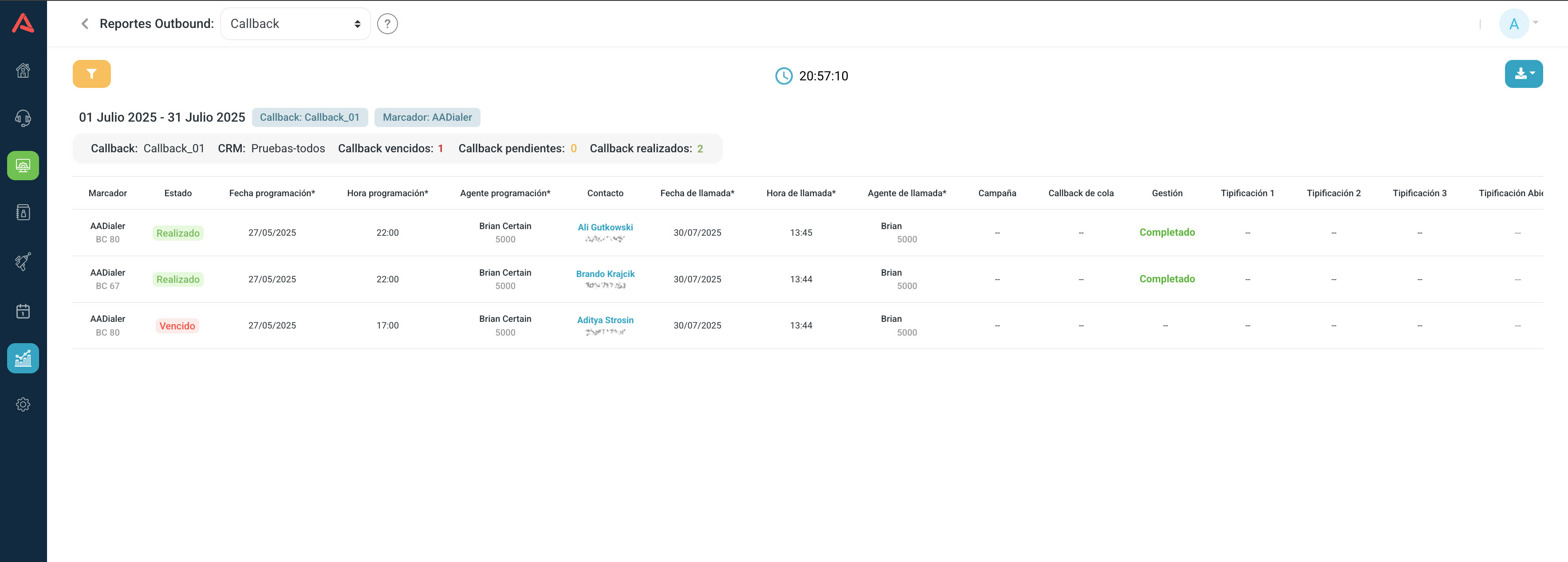
Callback is the history of promised call-backs: the ones an agent scheduled and the ones the system generated. It exists to answer whether they were kept.
The four statuses
- Pending
- The time has not come yet.
- Complete
- The call was made.
- Expired
- The time passed and nobody called.
- Rescheduled
- It was moved to another date.
Above the table all four come counted, so the size of the problem is visible before you go into the detail.
Field dictionary
The table is split into two halves worth reading against each other: what was promised and what happened.
| Field | Description |
|---|---|
| Callback | The identifier of the commitment |
| Dialer | Which dialer it came from |
| Segment | The segment of the base |
| Status | Pending, Complete, Expired or Rescheduled |
| Scheduled date | The day the call was promised for |
| Scheduled time | The promised time |
| Scheduled agent | Who made the commitment, with their number and name |
| Contact | The contact's name |
| Dial number | The number that was to be called |
| Called date | The day the call actually happened |
| Called time | The actual time |
| Called agent | Who made it, with their number and name |
| Campaign | The campaign it belongs to |
| Queue Callback | Whether a campaign generated it instead of an agent |
| Management | How it ended, if it happened at all |
| Typification 1, 2 and 3 | How it was classified |
| Open Typification | The agent's comment |
What you decide with it
The agent who schedules and the agent who calls need not be the same, and those two columns together are what tell you whether the commitment travelled properly from one shift to the next.
Many Expired is an operational problem: somebody promised and nobody called. Many Rescheduled is usually something else, either bad scheduling or a contact who is hard to reach, and you tell them apart by looking at whether it is always the same contact being moved or always the same agent moving them.
Queue Callback separates the commitments a person made from the ones the system generated. They are different things: the first is a promise somebody made, the second is a rule that fired.
Management Summary
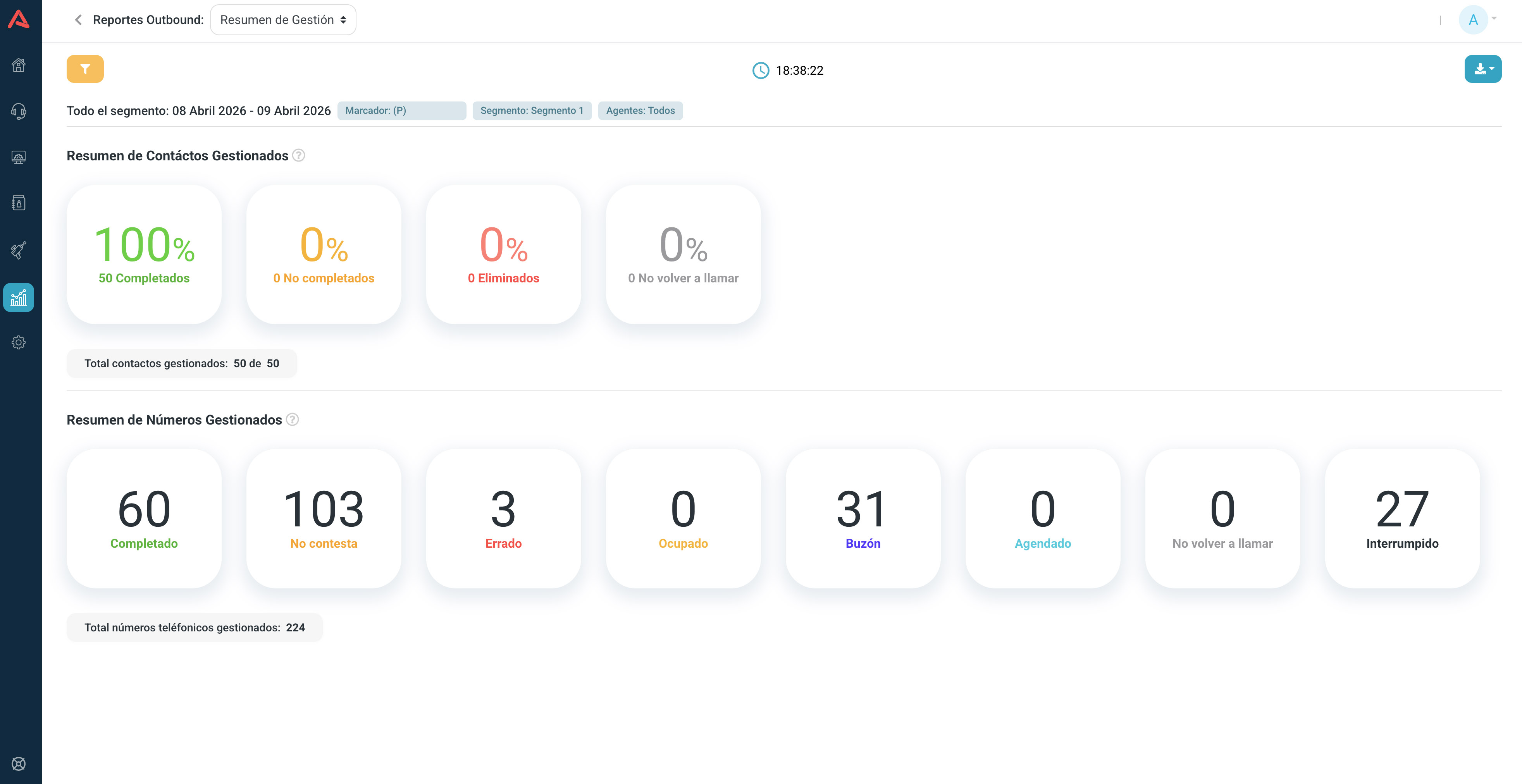
The Management Summary is the quick read on how a campaign is going. It has no call rows, just two totals, and the point is understanding why there are two and not one.
A contact is not a number
A contact is a person in the CRM and counts once, however many numbers they have. A number is each line that gets dialled, and one contact can contribute several, on top of the retries.
That is why there are always more numbers than contacts, and why the two summaries never reconcile. It is not an error: they measure different things.
- Summary of Managed Contacts
- How far you have got through the base. Complete, not complete, deleted and do-not-call.
- Summary of Managed Numbers
- How much work was done. Complete, no answer, wrong number, busy, voicemail, scheduled, do-not-call and interrupted.
The contact summary answers how much is left. The number summary answers what it cost.
What you decide with it
Many numbers worked with few contacts completed is a reachability problem, not an effort one: a lot of dialling and not much talking.
Many wrong numbers point at the quality of the base. Many no answer point at the time of day. And many attempts per contact mean your retry strategy is working the same people over and over.
Blaster
The Blaster report covers campaigns that dial with no agent: when somebody picks up, what answers is an IVR, a voicebot or an audio file.
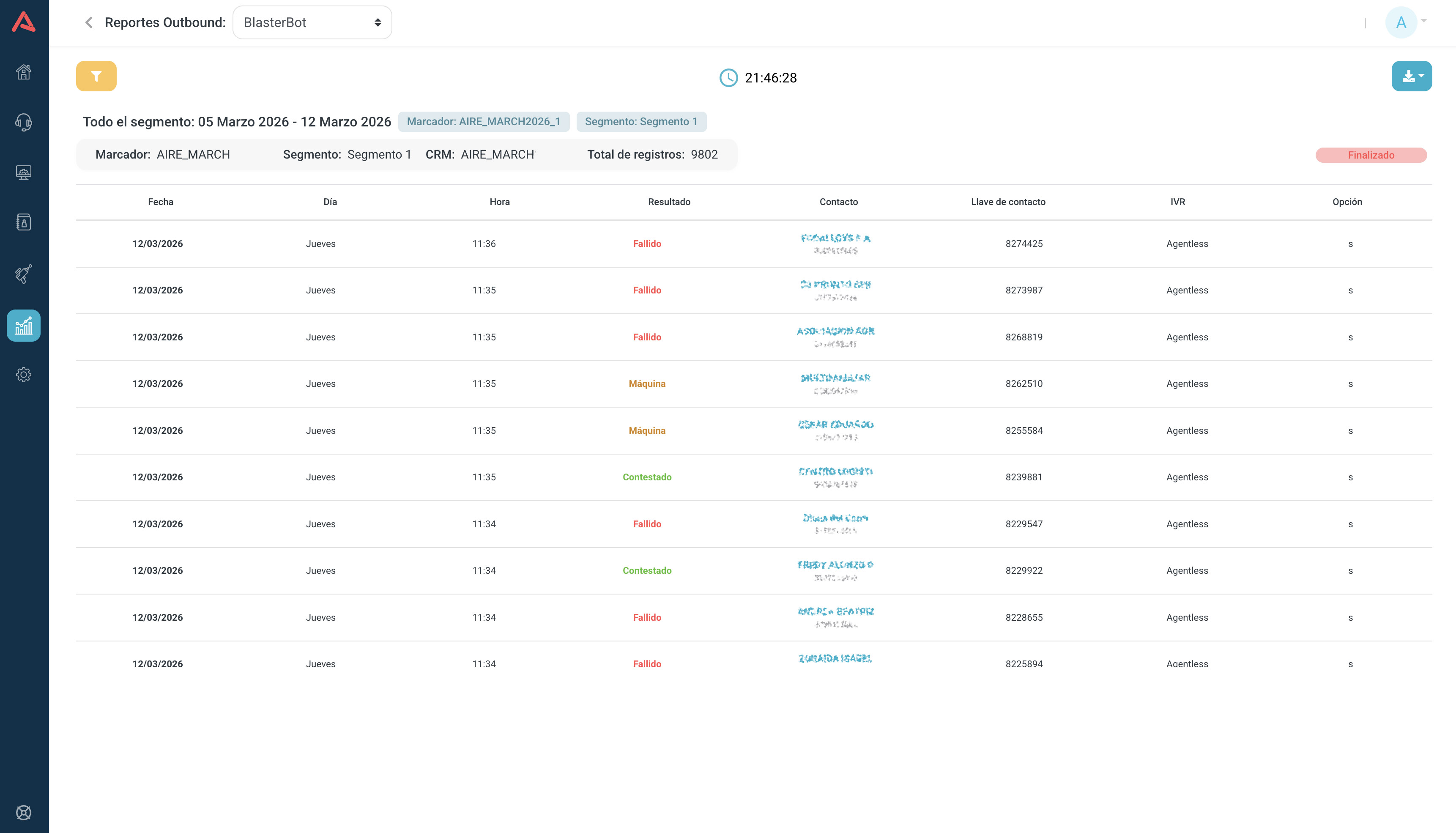
It shares the segment status bar and the AMD logic with General, but its table is far shorter because there is no agent work to record.
| Field | Description |
|---|---|
| Date | The day of the attempt |
| Day | The day of the week |
| Time | The time of the attempt |
| AMD | Who picked up: human, machine or failed |
| CRM | Which CRM the contact came from |
| Contact | The contact's name |
| Phone | The number that was dialled |
| Contact key | Their identifier in the CRM |
| IVR | The flow that answered the call |
| Option | Which point of the flow it entered at |
What you decide with it
A high share of machine is almost always a timing problem, not a database one: you are calling when people are not there. Many failed really are the database.
And if plenty of humans pick up but the flow goes nowhere, the problem is in the IVR and you chase it in IVR Results, which is where you see which option they pressed and where they stopped.
Predictive
Predictive shows what the dialer does before an agent enters the picture. It is the report of the contact engine, not of the conversation.
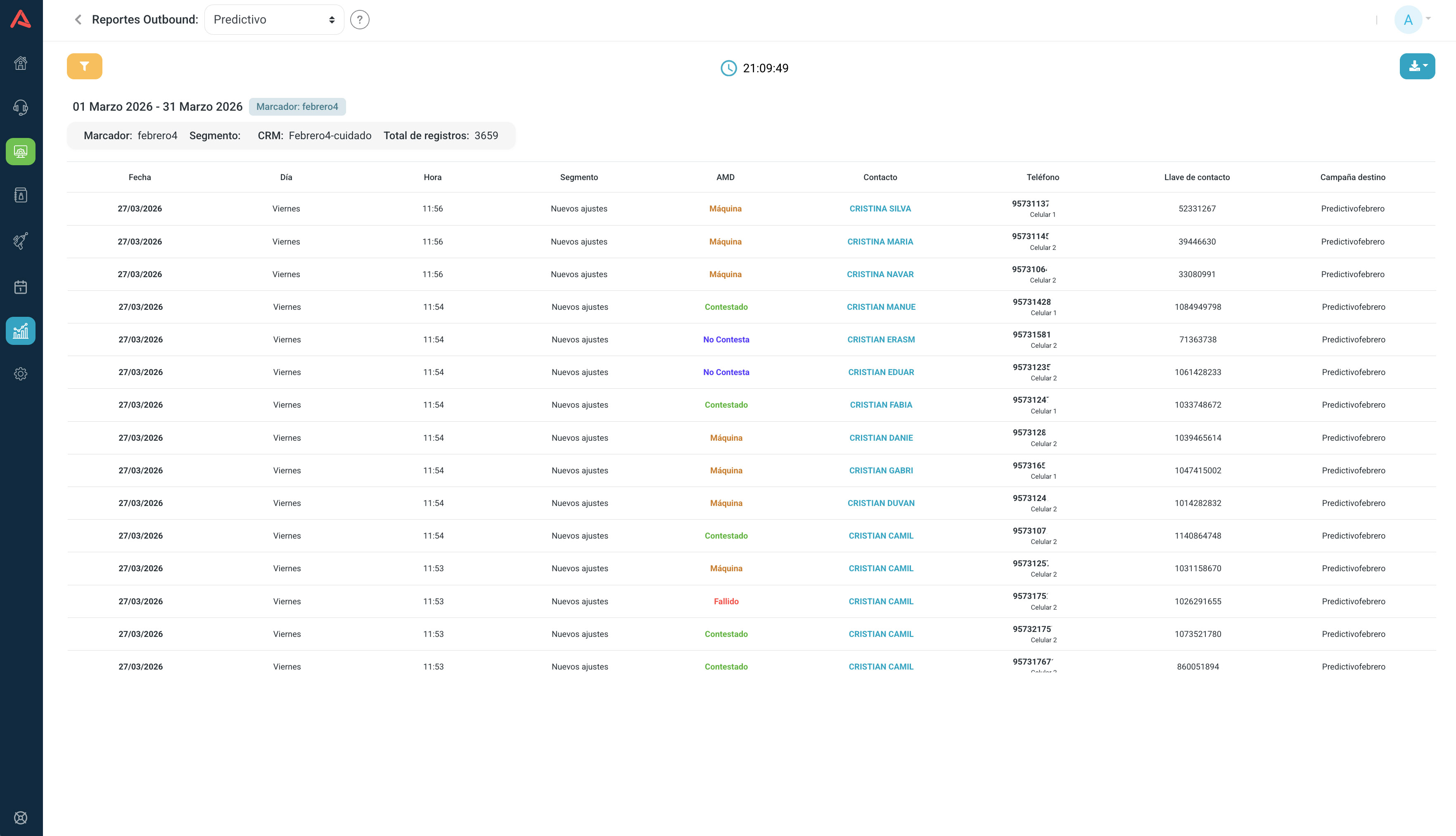
This report does not carry the agent's work. Typification, talk time, ACW and the survey score are not here, because on predictive the connected call is handed to an inbound campaign and from that point on the inbound voice reports keep the count.
The Phone column
It is the most useful column in the report and the one most often overlooked. On top of the number dialled, it carries the phone field: which CRM field that number came out of, whether Mobile 1, Mobile 2 or the landline.
With that you can tell which of a person's numbers works and which does not, and above all which of your base's fields is worth anything. If Mobile 2 fails consistently across the whole operation, the problem is not one contact but how that field is being filled.
Field dictionary
| Field | Description |
|---|---|
| Date | The day of the attempt |
| Day | The day of the week |
| Time | The time of the attempt |
| Segment | The segment of the base |
| AMD | What the dialer detected: human, machine, no answer or failed |
| CRM | Which CRM the contact came from |
| Contact | The contact's name |
| Phone | The number that was dialled |
| Phone field | Which CRM field that number came from |
| Contact key | Their identifier in the CRM |
| Destination Campaign | The inbound campaign the connected call was handed to |
What you decide with it
The ratio between attempts and humans detected is your real reachability, and it is the number to have in hand before arguing about whether the dialer is well configured.
Then comes the fine work: which time band turns up the most humans, and which phone fields contribute versus which only burn attempts.
Typification
The Typification report consolidates how agents classified what happened on each call. It is the report that translates the operation into business language.
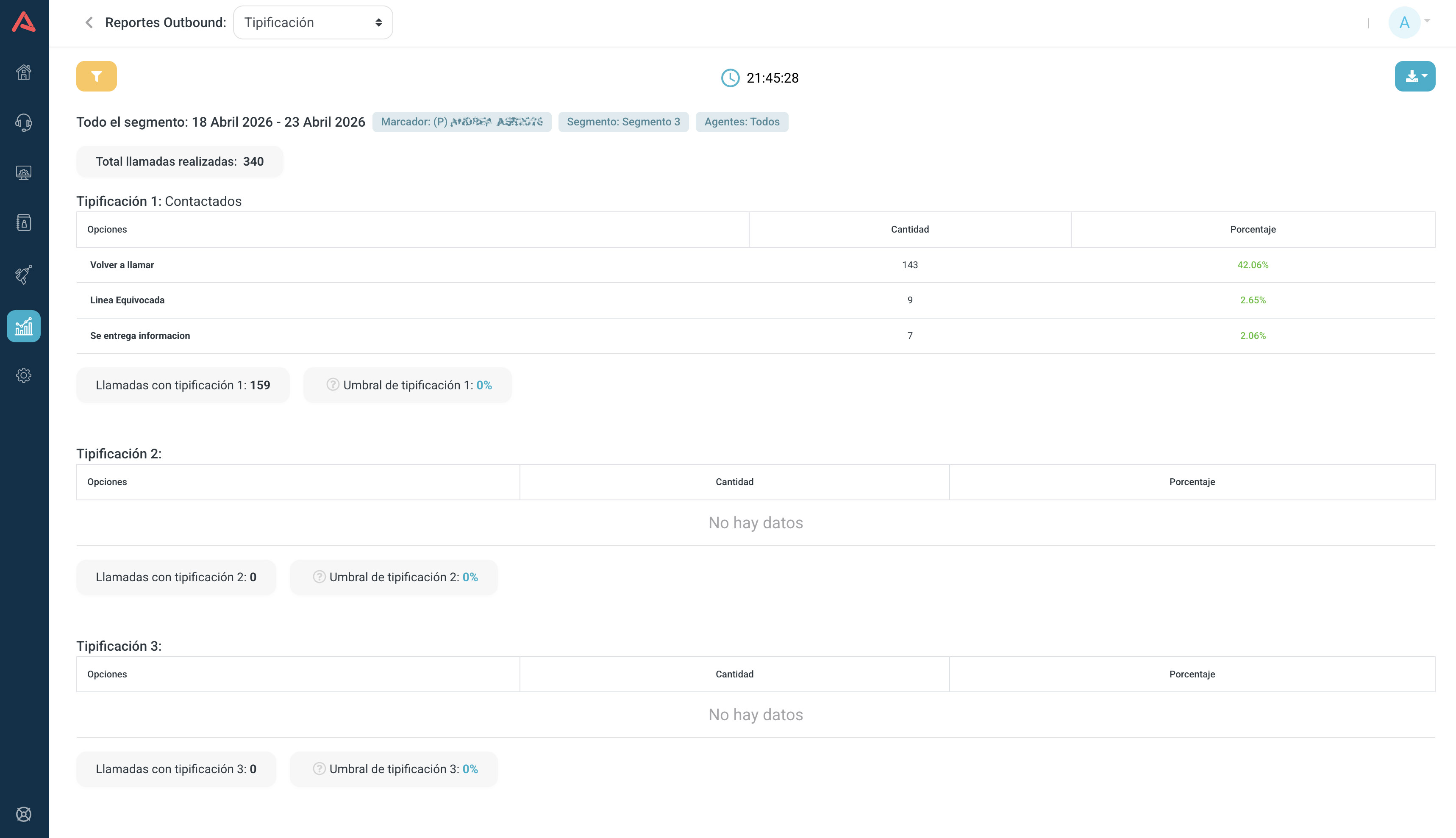
Audara handles up to three levels of typification, so the report shows them separately. The first is the main classification, and the second and third refine it if they are configured.
At each level you see the Options that dialer has, the Amount of times each one was picked and its Percentage of the total.
The typification threshold
Above sit Total calls made and Calls with typification, and between the two comes the Typification Threshold: what share of calls ended up classified. You can set your own threshold, and the value is painted green if it reaches it and red if it does not.
This is the number to look at first. If only 60% of calls are typified, the rest of the report describes a biased sample: those are the calls somebody bothered to classify, not all of them. Before drawing business conclusions, check how much is being typified.
Typification options are configured per dialer and per campaign, so two campaigns do not compare directly: each has its own catalogue.