CDR
Every call in detail, one by one
What the CDR report is
The CDR, short for Call Detail Record, is the log of every call that went through Audara. Every call means every call: the ones that came in, the ones that went out, internal calls between extensions, the ones a service like an IVR or a bot handled, and transfers.
It is the rawest report you have. The others summarise, group and work out indicators; this one shows the call exactly as it was recorded, one row per call, with its full technical detail.
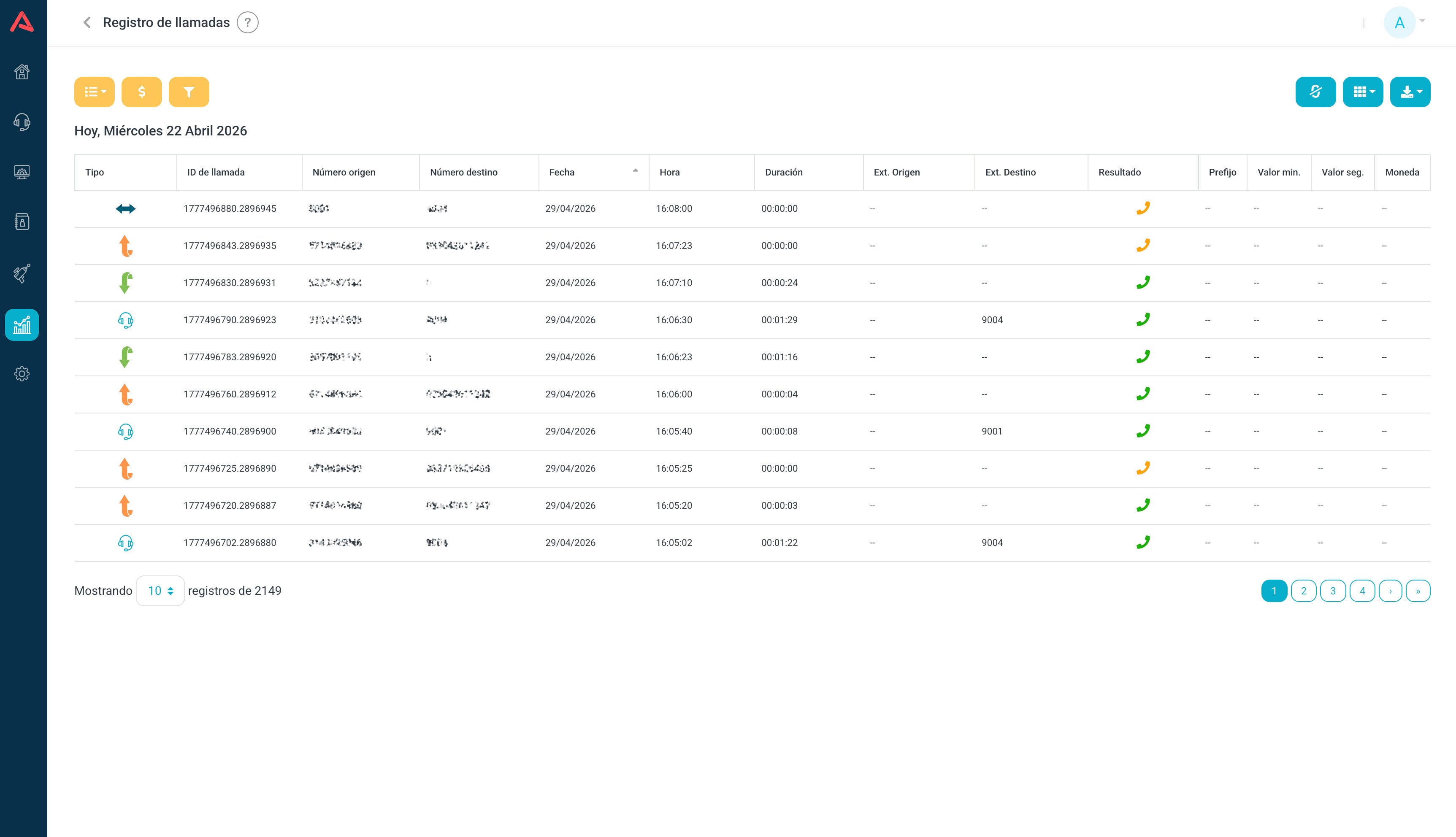
That is why it is where you go to answer "what exactly happened on this call?": auditing the operation, looking into a complaint, confirming whether a call ever came in, or pulling the raw data out to analyse it elsewhere.
If you have Rates set up, the CDR also shows you what each outbound call cost on the route it took.
Using the CDR report
The CDR comes in two views, and the yellow button on the toolbar switches between them. The list shows calls one by one and is the one for hunting down a specific case. The graph groups those same calls into counts and average duration, and into call types, and is the one for seeing the shape of your traffic.
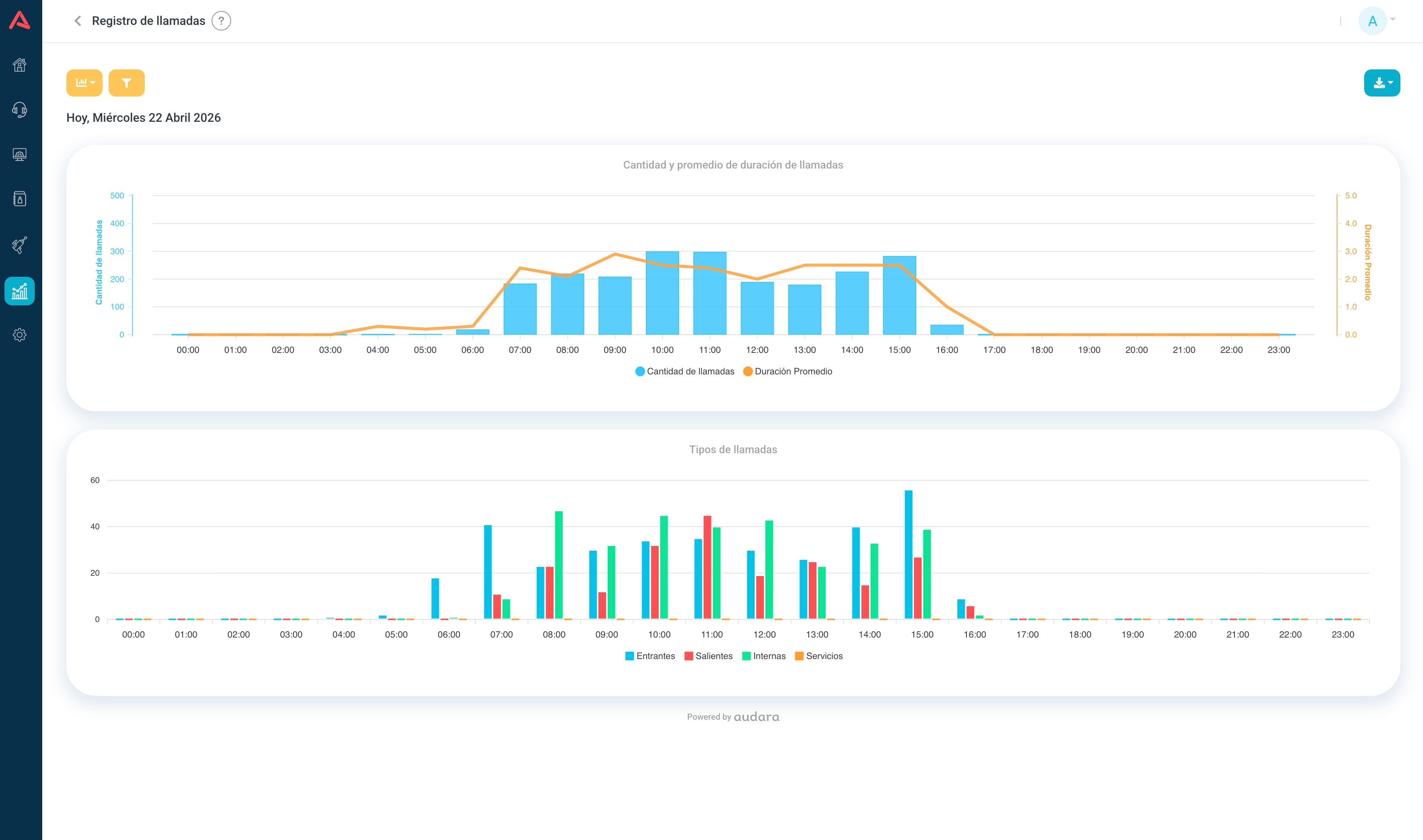
How the toolbar, the view switch and the CSV download work is in the Reports article, because it is the same everywhere.
The CDR filters
Here is where it differs. The CDR carries the finest filters in the whole analytics module, because it is built to find one call among thousands:
- Date
- Today, Yesterday, Last 7 days or Range. The CDR does not offer the year option.
- Departments
- Narrows the search to one area.
- Call ID
- The direct lookup by unique identifier, for when you already know which call you want.
- Source and Destination
- The numbers, each with its own condition: Contains, Exact, Starts with or Ends in.
- Caller ID
- The caller ID, with those same four conditions.
- Prefix
- Picked from the ones your operation actually uses.
- Channel
- The technical channel the call came in or went out on.
- Time (mm:ss)
- The duration, with the conditions Equal to, More than and Less than.
- Call Type
- All, Incoming, Outgoing, Internal, Services, Agent Call or Transfer.
The CDR date range is capped at 31 days. Once you pick the start date, the end date calendar will not let you go past that. If you need a longer period, the query goes in chunks.
Field dictionary
The downloaded file carries 35 columns, in this order. The table on screen shows fewer, and the columns button lets you choose which.
| Field | Description |
|---|---|
| callType | Call type: incoming, outgoing, internal, service |
| uniqueId | Unique identifier for this call |
| userField | Origin marker for the record. On mobile calls it reads MOBILE |
| accountCode | Account code. On mobile calls this is what stands in as the source |
| sourceUserName | Name of the user placing the call |
| source | Source number |
| destinationUserName | Name at the destination |
| destination | Destination number |
| dcontext | Call context: the flow, campaign or IVR it passed through |
| clid | Full caller ID |
| sourceChannel | Technical channel at the source |
| destinationChannel | Technical channel at the destination |
| lastApp | Last application the call ran |
| lastData | Data tied to that last action |
| callDate | Call date |
| callTime | Call time |
| duration | Talk time, as hh:mm:ss. It counts from the moment someone answered, not from the first ring |
| amaFlags | Billing marker set by the switch |
| agentNumber | Number of the agent who took the call |
| dialerId | Dialer identifier, if the call came from one |
| comment | Comments or metadata |
| linkedId | Identifier that ties several calls together, such as the two legs of a transfer |
| peerAccount | Account at the other end |
| sequence | Order number of this record within the call |
| amdStatus | Answering machine detection result: human or machine |
| dnis | Number that was originally dialled |
| sourceExtension | Source extension |
| destinationExtension | Destination extension |
| sourceDepartment | Source department |
| destinationDepartment | Destination department |
| disposition | Result: ANSWERED, NO ANSWER, BUSY and so on |
| prefix | Prefix the call used |
| costMin | Cost per minute |
| costSec | Cost per second |
| rateCurrency | Currency the cost is in |
Watch out for duration: it is talk time, not the total length of the call. A call that rang for forty seconds and nobody answered comes through with a duration of zero, and it is still a call that happened.
When you are chasing a transfer, the field that holds it together is linkedId: both legs of the call share that identifier even though each one has its own uniqueId. Filtering by the customer's number and sorting by time is the quick way to rebuild the whole journey.