Phone Routes
Where each call comes in and where it goes out
The route list
A route is the rule that decides where a call goes. You will find them under Setup > Telephony > Routes.
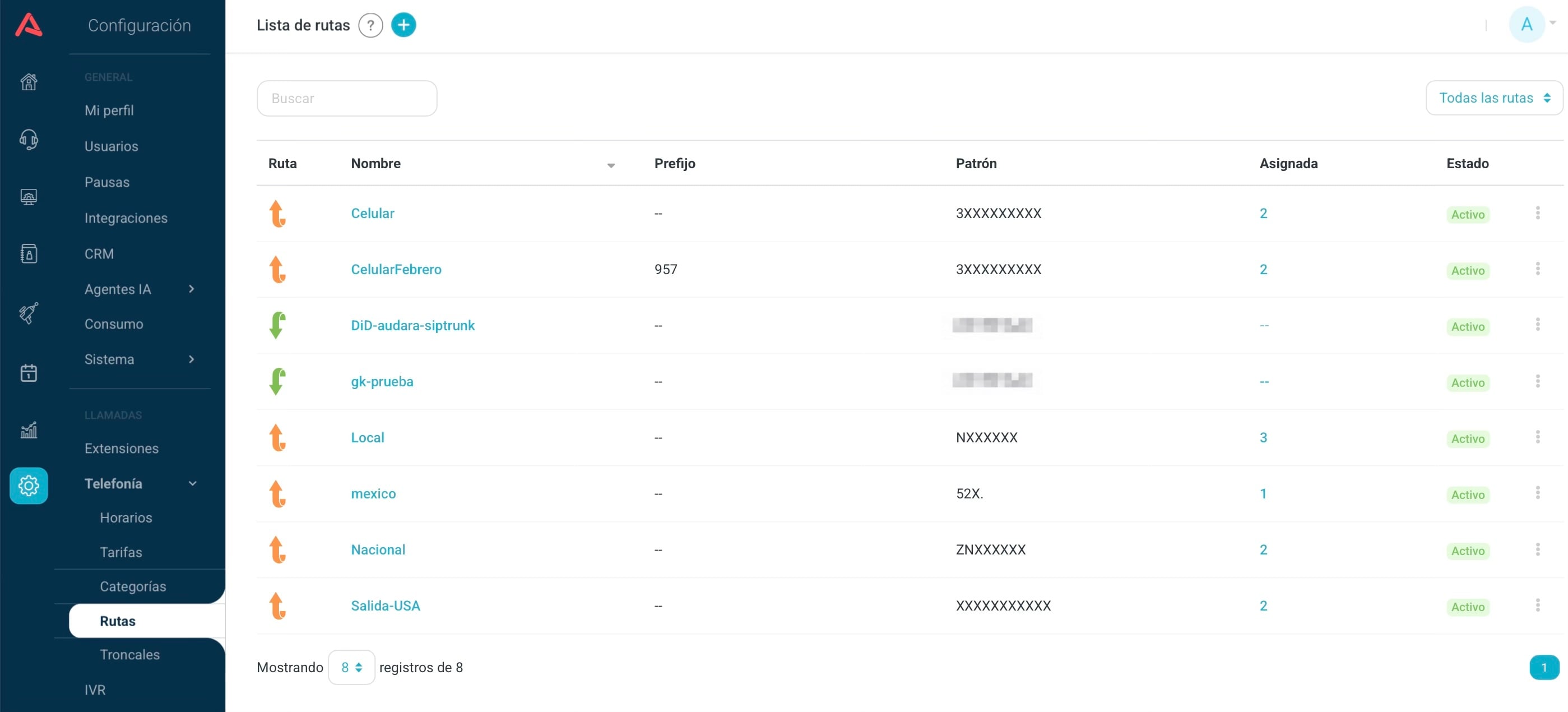
The table has six columns: Route, with the type arrow, Name, Prefix, Pattern, Assigned and Status. Above it there is a dropdown to keep only the incoming ones, only the outgoing ones, or all routes.
Assigned tells you which categories the route belongs to. Open it and you get the list, or a notice that the route is not assigned to any category.
The (+) button creates a route, and the first thing it asks is which type. The three-dot menu on each row lets you edit it, delete it, or switch it on and off without deleting anything.
Before creating routes you need at least one trunk set up under Trunks. A route with no trunk has nowhere to send the call.
What a route does
A route answers three questions about a call: which numbers trigger this rule, which conditions have to hold, and where the call goes when the rule matches.
That pattern is always written the same way, on incoming and outgoing routes alike:
- X
- Any digit from 0 to 9.
- Z
- Any digit from 1 to 9.
- N
- Any digit from 2 to 9.
- [ ]
- Any of the digits you put between brackets.
[2347-9]means 2, 3, 4, 7, 8 and 9. - .
- The wildcard: any combination of digits from that point on.
So 300XXXXXXX is the mobile numbers starting with 300, 601XXXXXXX the landlines of one city and 00. anything international.
A bare dot is dangerous on an outgoing route. A pattern like . lets anyone dial anything from any extension, and that is where the strange invoices come from. Write the most specific pattern you can.
The two types
There are incoming routes, which decide what happens to a call arriving from outside, and outgoing routes, which decide what each user may dial and how the call leaves.
It is a split of responsibilities more than of technology: the incoming one distributes, the outgoing one authorises.
- A typical incoming route
- The Support number reaches the Support campaign during business hours, and voicemail outside them.
- A typical outgoing route
- "National" lets people dial domestic landlines with no PIN; "International" asks for a PIN and leaves on a different trunk.
Incoming routes
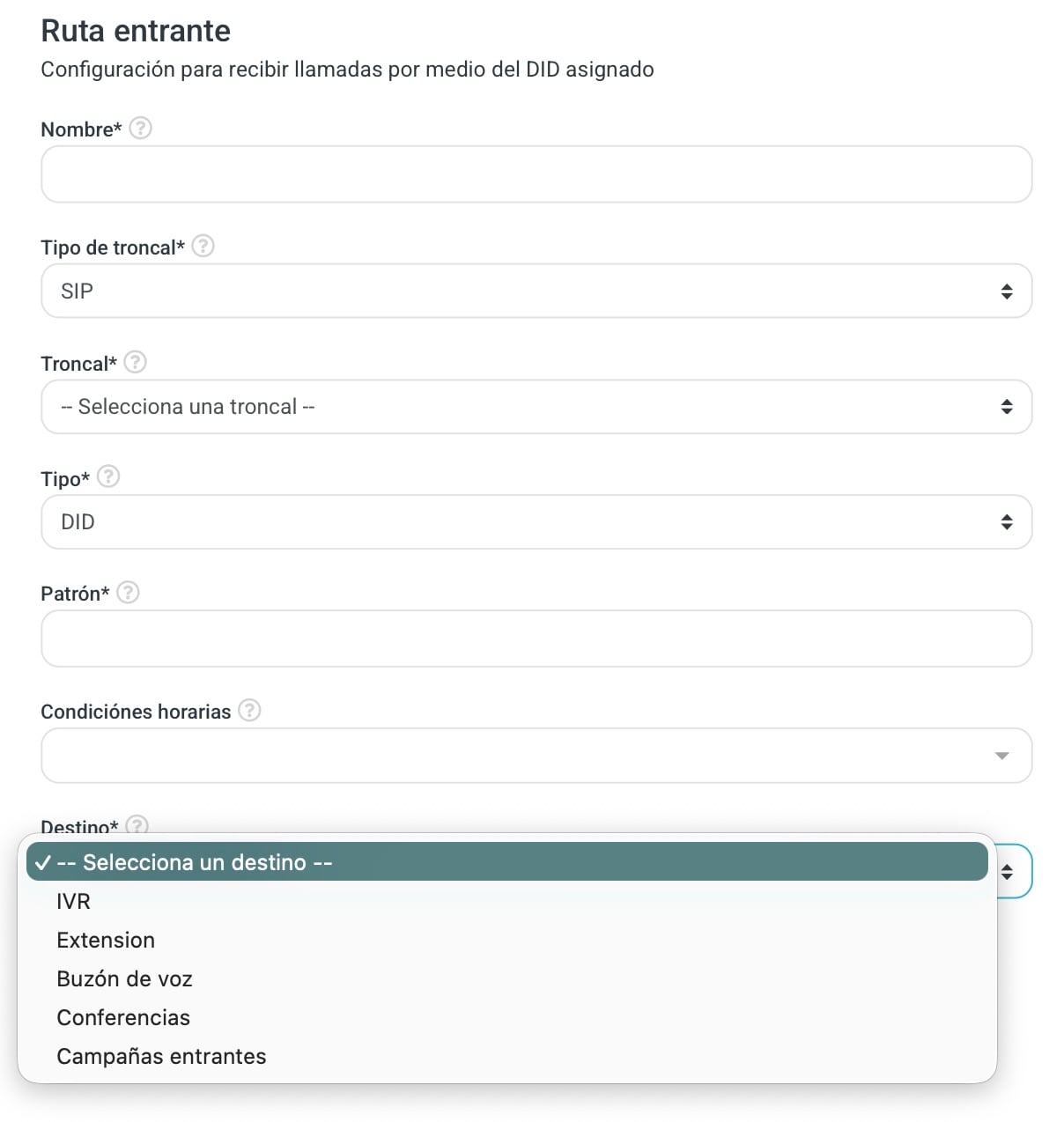
- Name
- What you call the route. Give it something that reads on its own: "Main support", "Sales Mexico".
- Trunk Type
- The technology of the trunk you contracted. Usually SIP.
- Trunk
- Which of your trunks brings these calls in.
- Type
- How the call is recognised. AUTO when the trunk has a single number and everything coming in on it belongs to this route. DID when you have several numbers and they have to be told apart by what was dialled, which goes in Pattern.
- Pattern
- The number exactly as the provider sends it. Watch this one: it is not how the customer dials it but how it arrives, and the two do not always match.
- Time Conditions
- Optional. Ties the route to a schedule, and then the call has two possible destinations.
- Destination
- Where the call goes when the condition holds, or always if you set no condition.
- Exception
- Where it goes when the condition does not hold. It only appears once you pick a time condition.
Destination and Exception offer the same five places: IVR, Extension, Voicemail, Conferences and Incoming Campaigns. Pick IVR and it also asks for the Option and the Position, so the call lands at a specific point of the menu instead of always at the top.
The destination has to exist before the route does. If the call is going to an incoming campaign, create the campaign first; the route only picks from what is already there.
In short: the call arrives, the number is matched against the pattern, the schedule is checked if there is one, and the call leaves towards Destination or towards Exception.
Outgoing routes
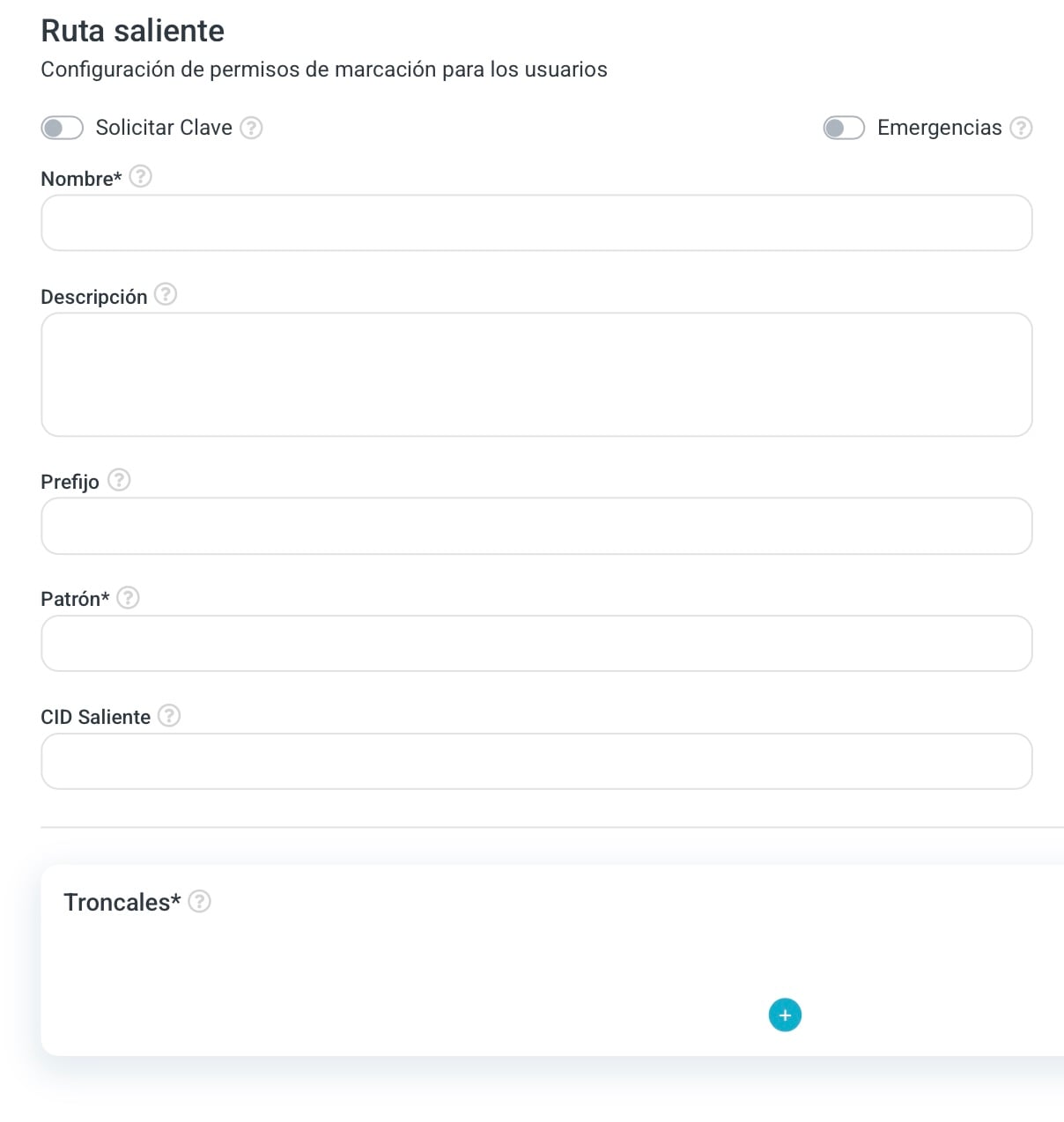
- Require PIN
- Asks for a password before allowing the call. The PIN is not set here but on each extension, so turning this on before configuring them leaves people unable to dial.
- Emergencies
- Marks the route as critical. Any extension may dial this pattern with no PIN and with no call time limit.
- Name
- Three characters minimum. The usual names are Local, Mobile and International.
- Description
- Optional, to leave a note on why this route exists.
- Prefix
- The number people have to dial first to pick this route.
- Pattern
- Which numbers this route authorises, using the symbols above.
- Outbound CID
- The number whoever receives the call will see. It works if your provider allows it.
- Trunks
- Where the call may leave from. You add them with the (+) button, one at a time.
The trunk list
Each trunk you add opens a Trunk Selection window with three fields: the Trunk, how many digits to Remove from the front and what to Add ahead of it. That is how you shape the number into what that provider expects without changing what the user dials.
The list is ordered and you reorder it by dragging the rows. That order is saved with the route, so the main trunk sits first and the others stay behind it as alternatives.
In short: the user dials, the number is matched against the pattern, PIN, prefix and CID are applied, and the call leaves on the route's trunk.
What the system will not let you do
You cannot delete an outgoing route that is assigned to a call category. Take it out of the category first, then delete it. The Assigned column on the list is what tells you whether that is your case.
It will not let you repeat things either: the name, the pattern and the prefix are unique, and on incoming routes so is the combination of trunk, type and pattern. If something already exists, the form tells you when you save.
The order for building telephony from scratch is trunks, then routes, then categories. And every new SIP extension needs a category assigned to it, so without outgoing routes there are no categories, and without categories extensions cannot dial.